Developer Guide
- Acknowledgements
- Setting up, getting started
- Design
- Implementation
- Documentation, logging, testing, configuration, dev-ops
- Appendix: Requirements
-
Appendix: Instructions for manual testing
- Launch and shutdown
- Adding a patron
- Editing a patron
- Finding a patron based on patron name
- Finding patrons with overdue books
- Adding a book
- Listing all books
- Listing all books related to a patron
- Editing a book
- Deleting a book
- Borrowing a book
- Returning a book or some books
- Requesting a book
- Finding books based on tags, author, title
- Appendix: Effort
Acknowledgements
- This project is based on the AddressBook-Level3 project created by the SE-EDU initiative.
- Libraries used: JavaFX, Jackson, JUnit5
Setting up, getting started
Refer to the guide Setting up and getting started.
Design
Architecture
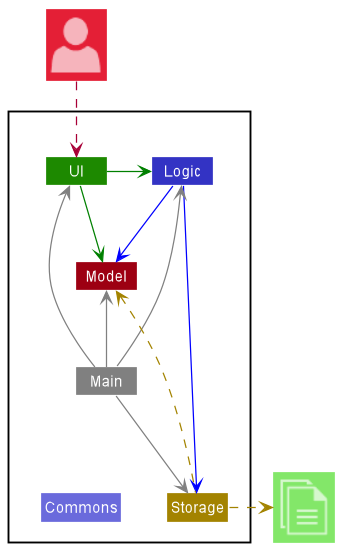
The Architecture Diagram given above explains the high-level design of the App.
Given below is a quick overview of main components and how they interact with each other.
Main components of the architecture
Main has two classes called Main and MainApp. It is responsible for,
- At app launch: Initializes the components in the correct sequence, and connects them up with each other.
- At shut down: Shuts down the components and invokes cleanup methods where necessary.
Commons represents a collection of classes used by multiple other components.
The rest of the App consists of four components.
-
UI: The UI of the App. -
Logic: The command executor. -
Model: Holds the data of the App in memory. -
Storage: Reads data from, and writes data to, the hard disk.
Each of the four main components (also shown in the diagram above),
- defines its API in an
interfacewith the same name as the Component. - implements its functionality using a concrete
{Component Name}Managerclass (which follows the corresponding APIinterfacementioned in the previous point).
For example, the Logic component defines its API in the Logic.java interface and implements its functionality using the LogicManager.java class which follows the Logic interface. Other components interact with a given component through its interface rather than the concrete class (reason: to prevent outside component’s being coupled to the implementation of a component), as illustrated in the (partial) class diagram below.
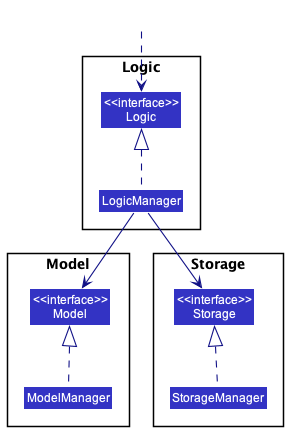
How the architecture components interact with each other
The Sequence Diagram below shows how the components interact with each other for the scenario where the user issues the command patron delete 1.
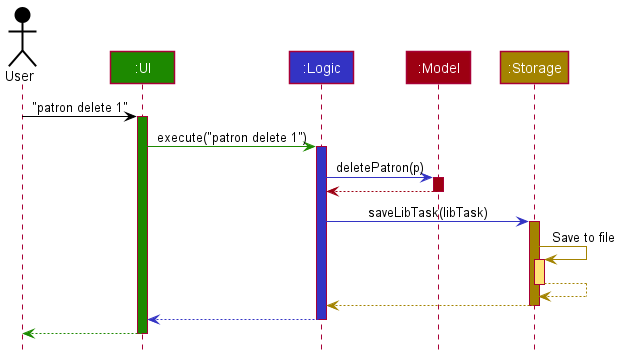
The sections below give more details of each component.
UI component
The API of this component is specified in Ui.java
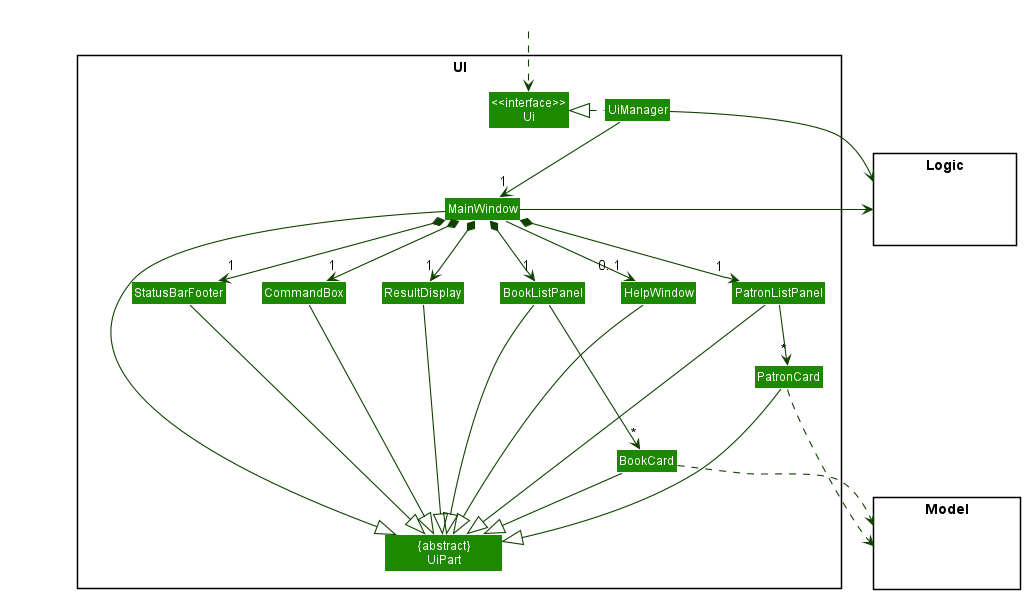
The UI consists of a MainWindow that is made up of parts e.g.CommandBox, ResultDisplay, PatronListPanel, BookListPanel, StatusBarFooter etc. All these, including the MainWindow, inherit from the abstract UiPart class which captures the commonalities between classes that represent parts of the visible GUI.
The UI component uses the JavaFx UI framework. The layout of these UI parts are defined in matching .fxml files that are in the src/main/resources/view folder. For example, the layout of the MainWindow is specified in MainWindow.fxml
The UI component,
- executes user commands using the
Logiccomponent. - listens for changes to
Modeldata so that the UI can be updated with the modified data. - keeps a reference to the
Logiccomponent, because theUIrelies on theLogicto execute commands. - depends on some classes in the
Modelcomponent, as it displaysPatronandBookobjects residing in theModel.
Logic component
API : Logic.java
Here’s a (partial) class diagram of the Logic component:
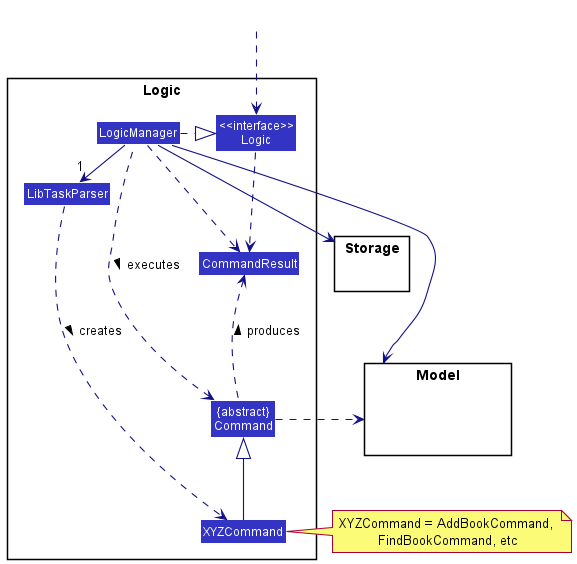
How the Logic component works:
- When
Logicis called upon to execute a command, it uses theLibTaskParserclass to parse the user command. - This results in a
Commandobject (more precisely, an object of one of its subclasses e.g.,AddPatronCommandorAddBookCommand) which is executed by theLogicManager. - The command can communicate with the
Modelwhen it is executed (e.g. to add a Patron or a Book). - The result of the command execution is encapsulated as a
CommandResultobject which is passed back to theUi, which is then used by theUito perform certain actions, such as displaying the results to the user.
The Sequence Diagram below illustrates the interactions within the Logic component for the execute("patron delete 1") API call.
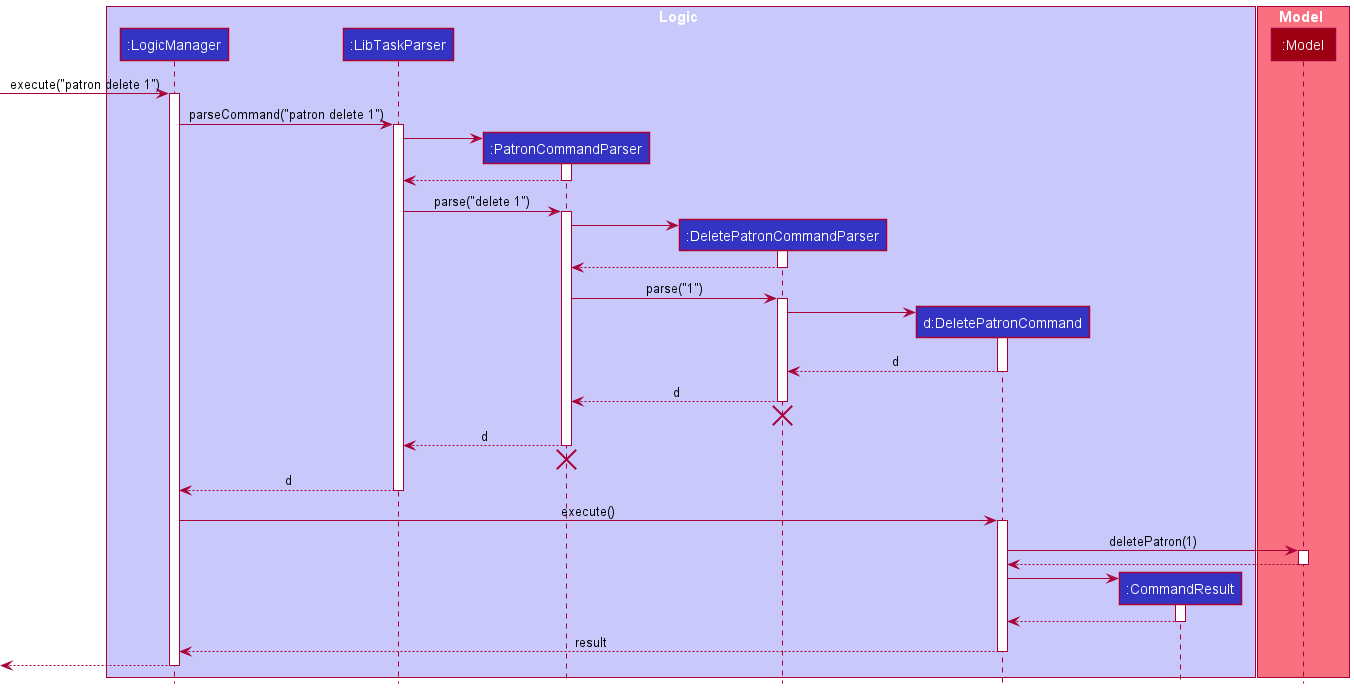
 Note: The lifeline for
 PatronCommandParser and DeletePatronCommandParser should end at the destroy marker (X) but due to a limitation of PlantUML, the lifeline reaches the end of diagram.
Here are the other classes in Logic (omitted from the class diagram above) that are used for parsing a user command:
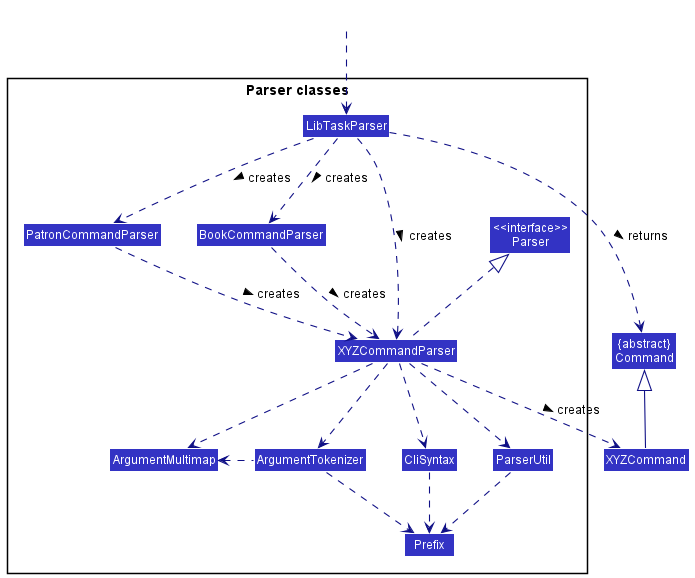
How the parsing works:
- When called upon to parse a user command, the
LibTaskParserclass creates aPatronCommandParserif the command starts withpatron, aBookCommandParserif the command starts withbook, and aXYZCommandParserotherwise. - If
PatronCommandParserorBookCommandParseris created, it will further create aXYZCommandParser(XYZis a placeholder for the specific command name e.g.,AddPatronCommandParserorAddBookCommandParser) which uses the other classes shown above to parse the user command and create aXYZCommandobject (e.g.,AddPatronCommandorAddBookCommand) which theLibTaskParserreturns back as aCommandobject. - All
XYZCommandParserclasses (e.g.,AddPatronCommandParser,AddBookCommandParser, …) implement theParserinterface so that they can be treated similarly where possible e.g, during testing.
Model component
API : Model.java
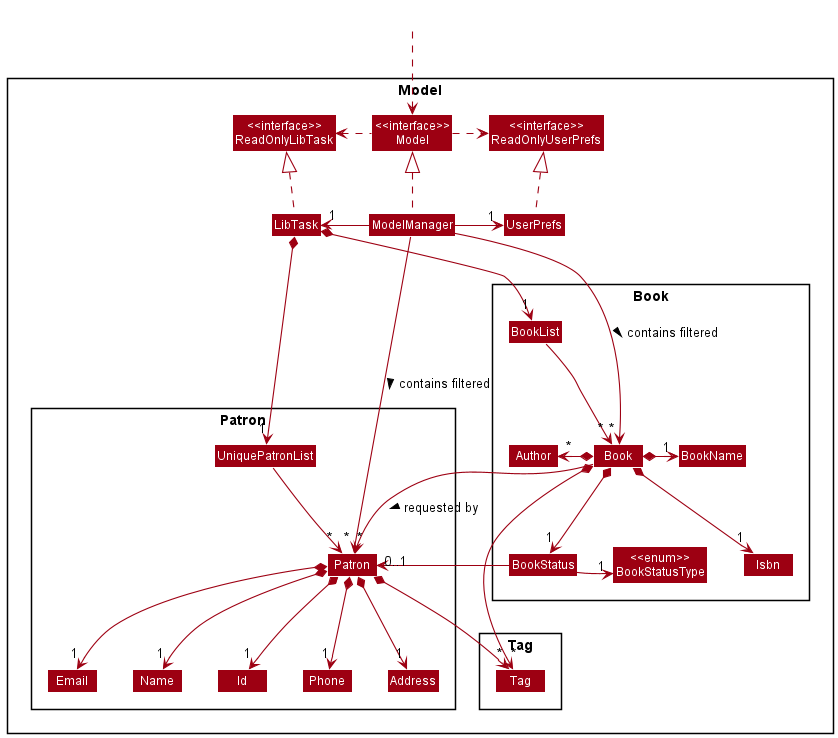
The Model component,
- stores the LibTask data i.e., all
Patronobjects (which are contained in aUniquePatronListobject) andBookobjects (which are contained in aBookListobject). - stores the currently ‘selected’
PatronandBookobjects (e.g., results of a search query) as a separate filtered list which is exposed to outsiders as an unmodifiableObservableList<Patron>andObservableList<Book>that can be ‘observed’ e.g. the UI can be bound to this list so that the UI automatically updates when the data in the list change. - stores a
UserPrefobject that represents the user’s preferences. This is exposed to the outside as aReadOnlyUserPrefobjects. - does not depend on any of the other three components (as the
Modelrepresents data entities of the domain, they should make sense on their own without depending on other components)
Note: An alternative (arguably, a more OOP) model is given below. It has a Tag list in the LibTask, which Patron references. This allows LibTask to only require one Tag object per unique tag, instead of each Patron needing their own Tag objects.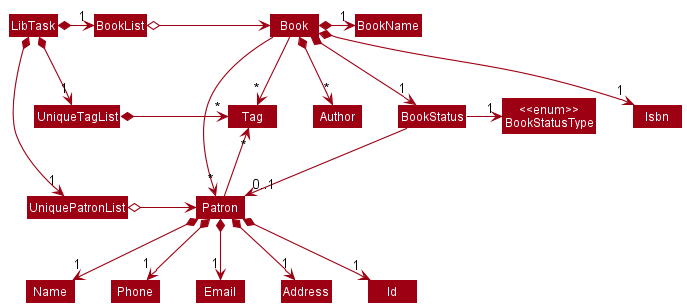
Storage component
API : Storage.java
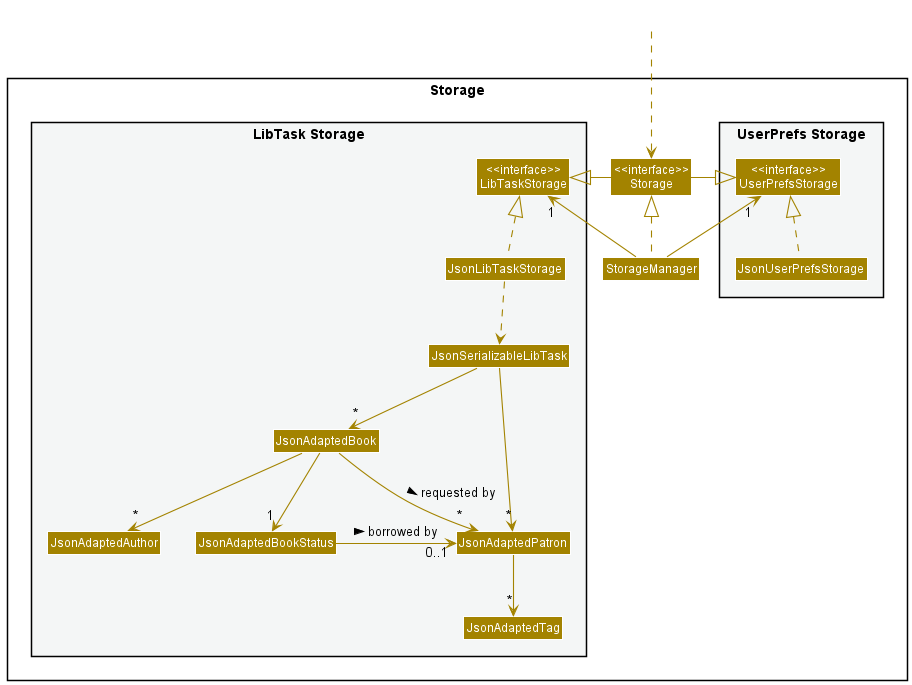
The Storage component,
- can save both LibTask data and user preference data in json format, and read them back into corresponding objects.
- implements both
LibTaskStorageandUserPrefStorage, which means it can be treated as either one (if only the functionality of only one is needed). - depends on some classes in the
Modelcomponent (because theStoragecomponent’s job is to save/retrieve objects that belong to theModel)
Common classes
Classes used by multiple components are in the seedu.address.commons package.
Implementation
This section describes some noteworthy details on how certain features are implemented.
Model
The class diagram for the Model can be seen above in the Model component section. Model contains two main object components, Book and Patron, with Book having a dependency on Patron. Such a design was chosen after a few iterations on other designs. The final design is documented here:
Implementation details
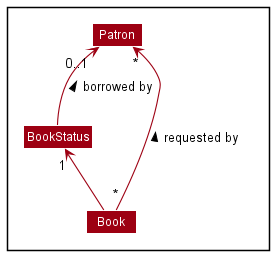
Book and Patron both have their own set of attributes, but only the most important ones are shown in the diagram above. Book refers a set of Patron objects as requesters. It also has a BookStatus containing an optional Patron representing the borrower of the book.
Design considerations
Initially, Patron and Book were designed in a way such that both classes contain references to each other. This design allows fast and direct access to certain information, such as all books borrowed and requested by a patron. However, the initial design results in cyclic reference among classes, which makes it impossible to store patron and book information in json format. For example, the patron json object needs to store a list of books it is referencing, which in turns store a list of patrons it is referencing, which in turn stores more patrons.
Furthermore, the initial design results in the problem of cyclic updates whenever data is modified. For example, when a patron’s name is changed, the corresponding borrower’s name of all books borrowed by that patron needs to be changed as well. Since Book is immutable, new Book objects are created to update the information, and as a result, all Patron objects referencing those old Book objects need to be updated as well. Since Patron is also immutable, the chain of never ending cyclic updates continues on.
Due to the downsides of the initial design, a decision was made to have only oneBook or Patron depending on the other. Book was chosen to depend on Patron because the UI needs to display information about borrowers and requesters together with the book. This design does not require the transversal of the whole UniquePatronList to identify the borrower and requesters of the book, since such information is stored in Book itself. However, transversal of the whole BookList is required to find all books related to a patron, or when updating a patron’s information. Nevertheless, the amortized cost is much lower as such commands are performed less frequently than the amount of UI updates.
Saving books and patrons to Json format
The saving of books and patrons to json format is performed by the Storage component, which class diagram can be seen above. The JsonSerializableLibTask stores both JsonAdaptedPatron and JsonAdaptedBook, which implementations will be discussed below.
Implementation details
JsonAdaptedBook is an object that represents a Book object in its json format. It is responsible for converting attributes in Book to json compatible formats. JsonApdatedBook contains a JsonAdaptedBookStatus , and may contain multiple instances of JsonAdaptedPatron, JsonAdaptedAuthor, and JsonAdaptedTag as requesters, authors, and tags respectively
JsonAdaptedPatron is an object that represents a Patron object in its json format. It is responsible for converting attributes in Patron to its json compatible formats. It may contain multiple instances of JsonAdaptedTag
Attributes of Book and Patron not mentioned above are stored directly as a String in JsonAdaptedBook and JsonAdaptedPatron respectively. For example, the isbn of a book is stored as a String and not converted to a class named JsonAdaptedIsbn before saving.
Design considerations
Aspect: How to store a list of patrons requesting for a book.
- Alternative 1 (current choice):
JsonAdaptedBookstores a list ofJsonAdaptedPatron- Pros: Fast program loading time as requester
Patronobjects can be created directly with all the provided information, without the need to search throughUniquePatronListfor aPatronwith matching name. - Cons: Overhead in converting
Patronobject toJsonAdaptedPatronand more storage space used.
- Pros: Fast program loading time as requester
- Alternative 2:
JsonAdaptedBookstores a list of String representing the name of the patrons. This is possible since patrons can be identified by their unique names.- Pros: Less overhead in converting
Patronobject toJsonAdaptedPatronand less storage space used. - Cons: Slow program loading time. When the program loads up, for every name we need to search through the whole
UniquePatronListfor the specifiedPatronobject before we can initialize aBookobject that refers to thePatronas requester. Furthermore, this design is not flexible to changes and will not work if patron names are no longer unique.
- Pros: Less overhead in converting
Borrow Feature
This feature allows users to keep track of books that are borrowed and the patrons who borrowed them, as well as its return date.
Implementation details
The borrow feature is facilitated by BorrowCommandParser and BorrowCommand. The operation is exposed in the Model interface as Model#borrowBook().
Given below is an example usage scenario and how the borrow mechanism behaves at each step:
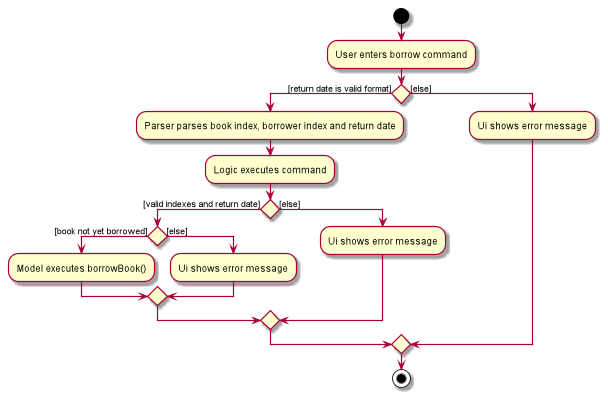
- The user enters the borrow command and provides the index of book to be borrowed, index of borrower patron, and the return date.
-
LibTaskParsercreates a newBorrowCommandParserafter preliminary processing of user input. -
BorrowCommandParsercreates a newBorrowCommandbased on the processed input. -
LogicManagerexecutes theBorrowCommand. -
BorrowCommandcallsModel#getFilteredPatronList()to get the list of displayed patrons, and then gets the borrower at the specified index. -
BorrowCommandcallsModel#getFilteredBookList()to get the list of displayed books, and then get the book to be borrowed at the specified index. -
BorrowCommandcallsModel#borrowBook()and passes the borrower, book to be borrowed and return date as parameters. - Finally,
BorrowCommandcreates aCommandResultand returns it toLogicManagerto complete the command.
The following sequence diagram shows how the borrow command works:
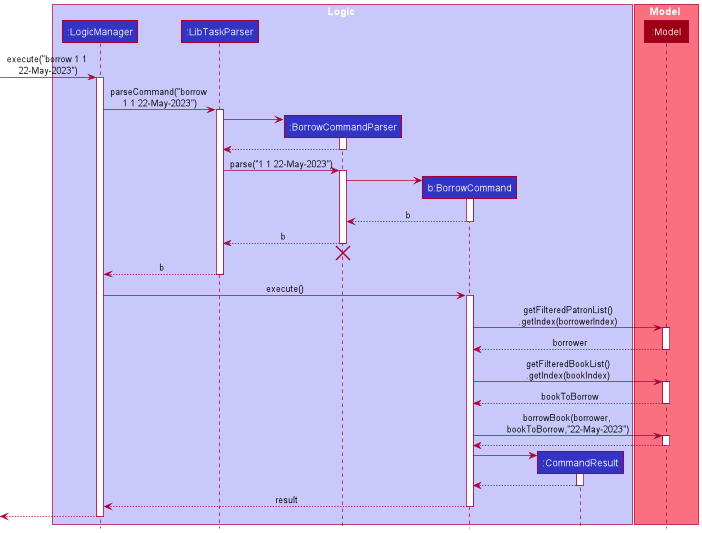
Note: The lifeline for BorrowCommandParser should end at the destroy marker (X) but due to a limitation of PlantUML, the lifeline reaches the end of diagram.
The following activity diagram summarizes what happens when a user executes a borrow command:
Design considerations
The borrow command is designed to be used in conjunction with the book find and patron find command. For instance, the user would first use patron find n/Alex Yeoh and book find n/Harry Potter to find the borrower and book to be borrowed, before entering borrow 1 1 23-May-2022 to keep track of Alex Yeoh borrowing Harry Potter until 23-May-2022.
This integration of borrow command with the find commands is important because LibTask can store large amounts of books and patrons, making it infeasible for the user to scroll through both patron list and book list to identify the target patron and book. By designing borrow command to work based on indexes, we do not restrict users to borrow books based on a fixed attribute, for example, book isbn and patron id. This allows users to search for books and patrons in any way they deem convenient (e.g. using tags, names etc.), thus enhancing the usability of borrow feature.
Return Feature
This feature allows users to return a borrowed book, or all books that were borrowed by a patron.
Implementation details
The borrow feature is facilitated by ReturnCommandParser, ReturnOneBookCommand, and ReturnAllBooksCommand. ReturnOneBookCommand is the concrete ReturnCommand class responsible for returning a single book, while ReturnAllBooksCommand is the concrete ReturnCommand class responsible fo returning all books borrowed by a patron. The functionality of returning all books by a patron is exposed in Model interface as Model#returnAllBorrowedBooks(), while the functionality to return a single book is facilitated by Model#setBook().
Due to the high similarities in both return commands, only the implementation of ReturnAllBooksCommand will be discussed below.
Given below is an example usage scenario and how the return mechanism behaves at each step:
- The user enters the return command and provides the index of patron whose books should be returned.
-
LibTaskParsercreates a newReturnCommandParserafter preliminary processing of user input. -
ReturnCommandParsercreates a newReturnAllBooksCommandbased on the processed input. -
LogicManagerexecutes theReturnAllBooksCommand. -
ReturnAllBooksCommandcallsModel#getFilteredPatronList()to get the list of displayed patrons, and then gets the borrower at the specified index. -
ReturnAllBooksCommandcallsModel#returnAllBorrowedBooks()and passes the borrower as parameter. -
ReturnAllBooksCommandcallsModel#deleteAllRequests()to delete all book requests for the returned books, and gets a message that reminds the user to notify patrons who requested for those books. - Finally,
ReturnAllBooksCommandcreates aCommandResultwith the message and returns it toLogicManagerto complete the command.
The following sequence diagram shows how the return command works:
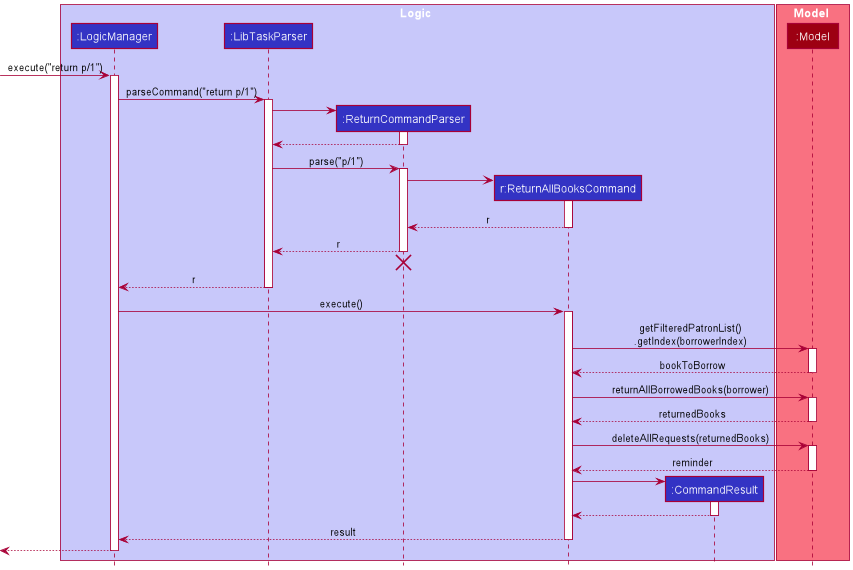
Note: The lifeline for ReturnCommandParser should end at the destroy marker (X) but due to a limitation of PlantUML, the lifeline reaches the end of diagram.
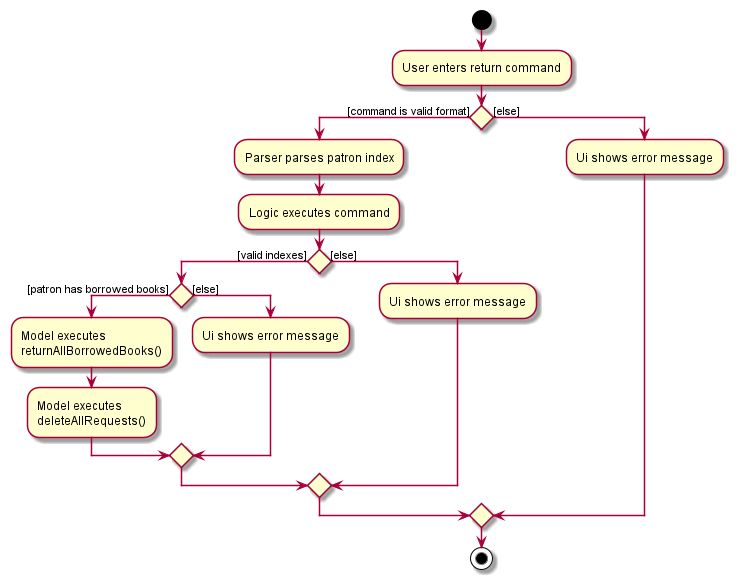
The following activity diagram summarizes what happens when a user executes a return command:
Design considerations
The return command is designed to be able to return multiple books in one command, while providing the user with the option of returning a single book. This enhances the usability of the feature, as the librarian can experience more efficient processing of books, while retaining fine-grain control of the process if needed (e.g. in situations when a patron only intends to return some of his/her borrowed books).
Despite having similar functionalities, the return commands are split into ReturnOneBookCommand and ReturnAllBooksCommand because they depend on different methods in Model, and have structurally similar but logically different execution. As per the Single Responsibility Principle, the return commands are separated into different classes so that each class is responsible for the logical implementation of only one subcommand.
Overdue Patron List Feature
This feature allows users to view a list of patrons with overdue books.
Implementation details
The overdue patron feature is facilitated by PatronCommandParser and OverduePatronCommand. OverduePatronCommand is the concrete Command class responsible for returning a filtered list of patrons with overdue books from LibTask’s main patron list. The class does this by checking if each patron has overdue books, a functionality exposed in the Model interface as Model#hasOverdueBooks().
Given below is an example usage scenario and how the overdue mechanism behaves at each step:
- The user enters the overdue command.
-
LibTaskParsercreates a newPatronCommandParserafter preliminary processing the first argument of user input aspatron. -
PatronCommandParsercreates a newOverduePatronCommandafter processing the second argument of user input asoverdue. -
LogicManagerexecutes theOverduePatronCommand. -
OverduePatronCommandcallsModel#updateFilteredPatronList()to get a filtered list of patrons with overdue books by passing inModel#hasOverdueBooks()as predicate argument. - Finally,
OverduePatronCommandcreates aCommandResultwith the message and returns it toLogicManagerto complete the command.
The following sequence diagram shows how the overdue command works:
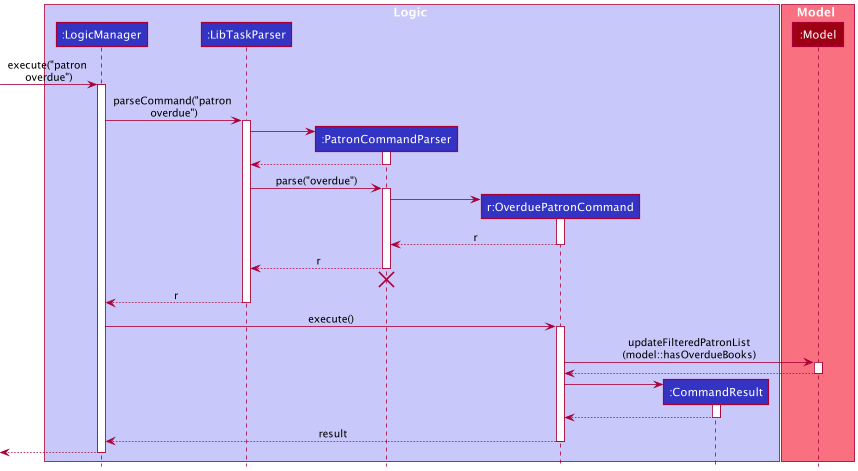
Note: The lifeline for PatronCommandParser should end at the destroy marker (X) but due to a limitation of PlantUML, the lifeline reaches the end of diagram.
The following activity diagram summarizes what happens when a user executes an overdue command:
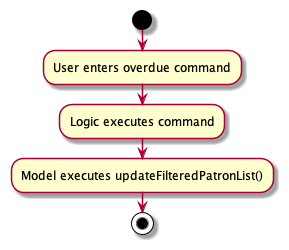
Design considerations
Unlike some other patron and book features, patron overdue is designed to be a stand-alone command (i.e. does not need to be used in conjunction with any other command) and requires no parameters. This is because iterating through LibTask patrons and filtering them based on their borrowed book statuses does not require pre-processing by any other command or additional information.
LibTask can store a large number of books and patrons, making it infeasible for the user to scroll through the book list to identify patrons with books borrowed beyond their return dates. The design of the overdue command hence enhances LibTask’s usability, as librarians can experience more efficient processing of overdue books.
patron overdue is designed to not affect the displayed book list while interacting with LibTask’s patron list (for example by displaying all overdue books in the displayed book list). However, executing the book related command in succession to the overdue command gives users a more detailed view the patron’s overdue books.
Request Feature
This feature allows users to keep track of books that are requested by patrons, and allow users to be automatically reminded to notify requesters when the books of interest become available.
Implementation details
The request feature is facilitated by BookCommandParser, RequestBookCommandParser, and RequestBookCommand. The operation is exposed in the Model interface as Model#addRequest().
Given below is an example usage scenario and how the request mechanism behaves at each step:
- The user enters the request command and provides the index of the requester patron, and the index of book to be requested.
-
LibTaskParsercreates a newBookCommandParserafter preliminary processing of user input, which in turns creates a newRequestBookCommandParser. -
RequestBookCommandParsercreates a newRequestBookCommandbased on the processed input. -
LogicManagerexecutes theRequestBookCommand. -
RequestBookCommandcallsModel#getFilteredPatronList()to get the list of displayed patrons, and then gets the requester at the specified index. It then callsModel#getFilteredBookList()to get the list of displayed books, and then get the book to be requested at the specified index. -
RequestBookCommandcallsModel#isBorrowing()to check that the requester is not currently borrowing a copy of the requested book, to prevent a patron from requesting a book he/she is already borrowing. -
RequestBookCommandcallsModel#hasAvailableCopy()to confirm that there are no available copies of the requested book. This is because there is no need for a book request if there is an available copy of the book. -
RequestBookCommandcallsModel#addRequest()to add the book request to all book copies with the same isbn as the requested book. - Finally,
RequestBookCommandcreates aCommandResultand returns it toLogicManagerto complete the command.
The following sequence diagram shows how the request command works:
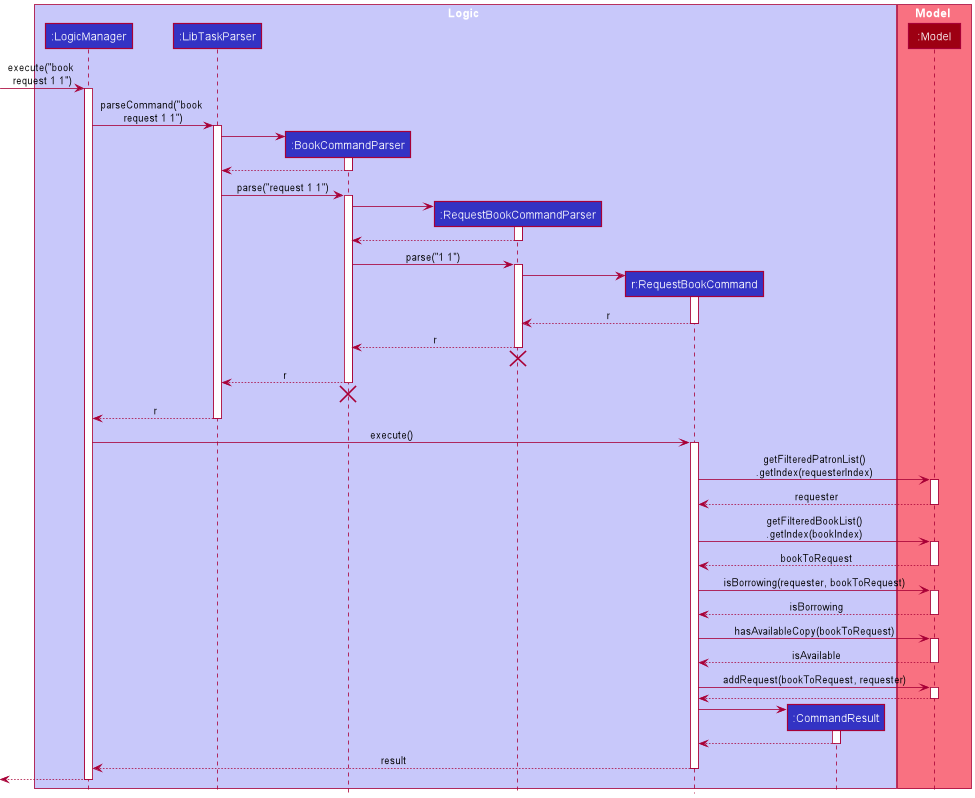
Note: The lifeline for BookCommandParser and RequestBookCommandParser should end at the destroy marker (X) but due to a limitation of PlantUML, the lifeline reaches the end of diagram.
The following activity diagram summarizes what happens when a user executes a request command:
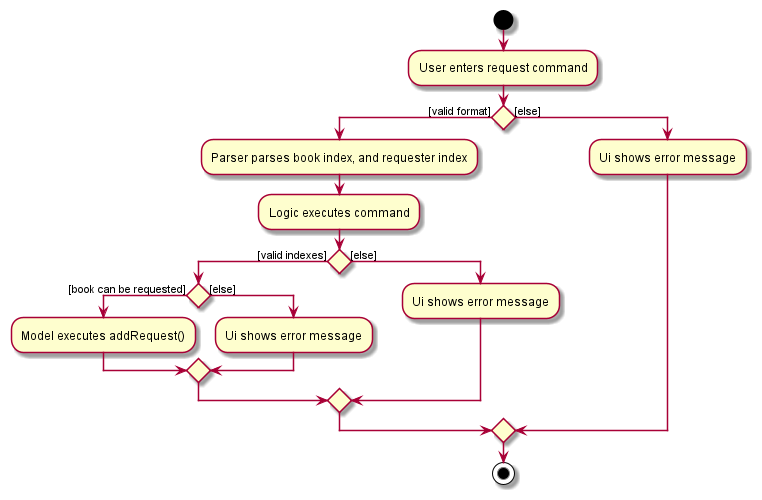
Design considerations
Each book request is designed to bind to an isbn instead of a book copy. For example, when a patron requests to be notified when the first book becomes available, LibTask attaches the book request to all books with the same isbn as the first book. This is in-line with our use case, as it is rational to assume that patrons are not particular about which book copy they are requesting for.
Associating a book request with multiple book copies introduces some problems. Initially, when a book becomes available, the same reminder message to the user will be printed multiple times, once per book request per book copy. Nevertheless, this is solved by using a Set to store reminder messages so that identical reminder messages will not be added multiple times.
Book Related Feature
This feature allows users to list and view all the books borrowed or requested by a patron.
Implementation details
The related feature is facilitated by BookCommandParser, RelatedBookCommandParser, and RelatedBookCommand.
Given below is an example usage scenario and how the related mechanism behaves at each step:
- The user enters the related command and provides the index of the patron to relate to.
-
LibTaskParsercreates a newBookCommandParserafter preliminary processing of user input, which in turn creates a newRelatedBookCommandParser. -
RelatedBookCommandParsercreates a newRelatedBookCommandbased on the processed input. -
RelatedBookCommandobject would be returned toLogicManager. -
LogicManagerthen executes theRelatedBookCommandobject. -
RelatedBookCommandcallsModel#getFilteredPatronList()to get the list of displayed patrons, and then gets the patron at that specified index. -
RelatedBookCommandthen creates aBookRelatedToPatronPredicateobject namedpredicatewith the patron. -
RelatedBookCommandcallsModel#updateFilteredBookList()withpredicate, resulting in the book list to be updated to display all the books borrowed and requested by the patron. - Finally,
RelatedBookCommandcreates aCommandResultand returns it toLogicManagerto complete the command.
The following sequence diagram shows how the related command works:
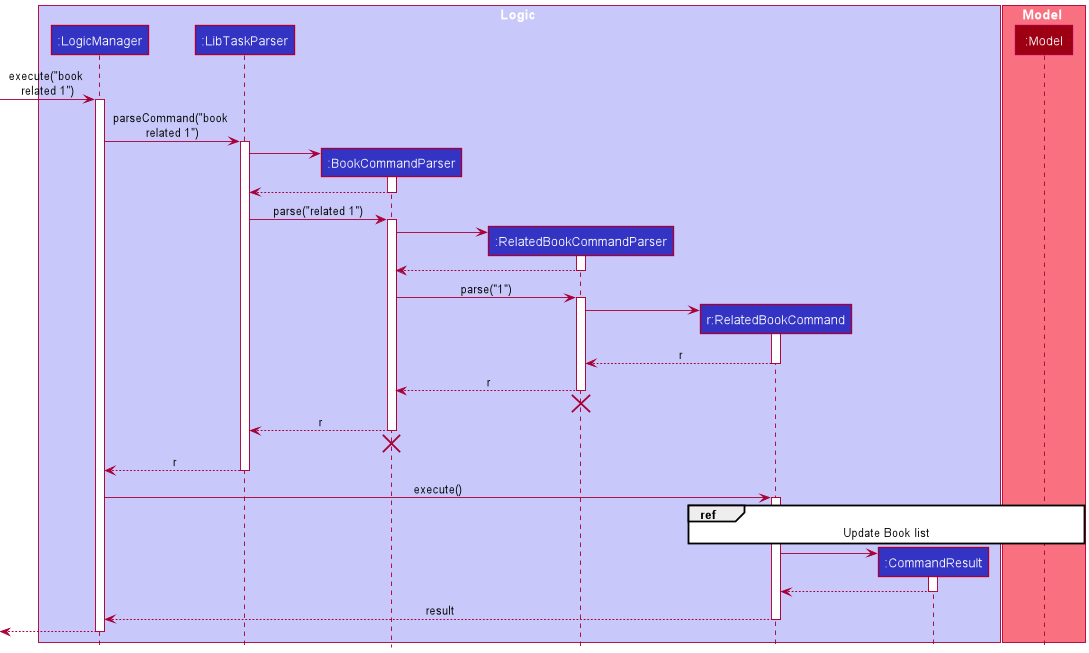
The following sequence diagram is for the reference frame in the above diagram:
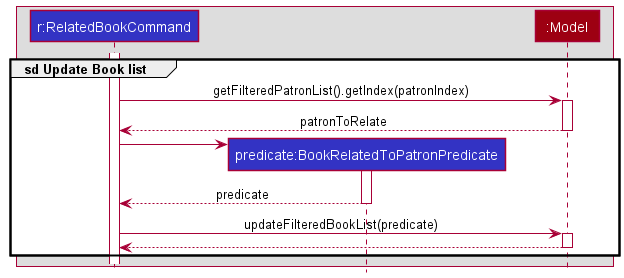
Note: The lifeline for BookCommandParser and RelatedBookCommandParser should end at the destroy marker (X) but due to a limitation of PlantUML, the lifeline reaches the end of diagram.
The following activity diagram summarizes what happens when a user executes a related command:
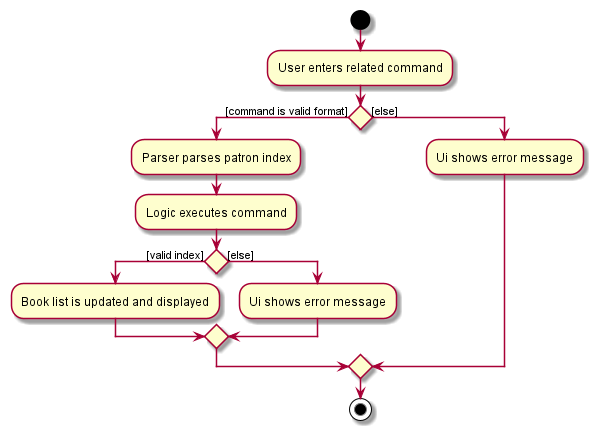
Design considerations
LibTask can store a large number of books and patrons, making it infeasible for the user to scroll through the book list to identify the books borrowed or requested by a patron. The design of the related command hence enhances LibTask’s usability, as librarians can be more efficient in identifying the books related to the patron.
Book Find feature
This feature allows users to search for any books with either the tag, title or author’s name.
Implementation
The Book find feature is facilitated by the BookCommandParser, FindBookParser and FindBookCommand.
As the book can be found using one of 3 parameters, only the implementation of a search using the tag will be shown, as they are all highly similar.
Given below is an example usage scenario and how the request mechanism behaves at each step:
- The user enters a book find command and provides the parameter for the search query.
-
LibTaskParsercreates a newBookCommandParserafter preliminary processing of user input, which in turns creates a newFindBookParser. -
FindBookParsercreates aBookTagContainsKeywordsPredicateobjectpredicatewith the search query. -
FindBookParsercreates a newFindBookCommandbased on the processed input and passes thepredicateon. -
LogicManagerthen executes theFindBookCommand. -
FindBookCommandcallsModel#updateFilteredBookList()with thepredicate, resulting in the book list to be updated to display all the books that match the given search query. - Finally, the
FindBookCommandcreates aCommandResultand returns it toLogicManagerto complete the command.
The following sequence diagram shows how the request command works:
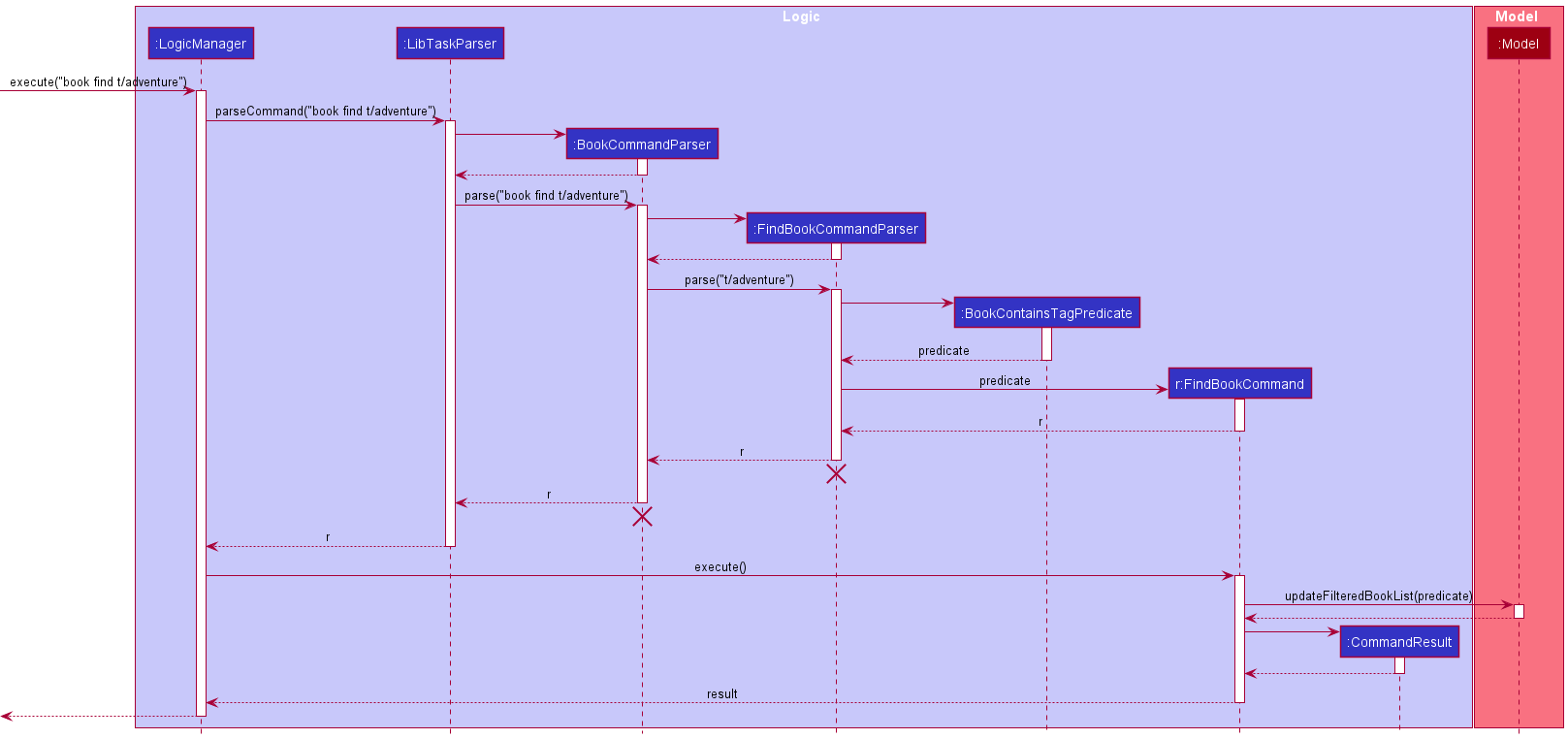
Note: The lifeline for BookCommandParser and FindBookCommandParser should end at the destroy marker (X) but due to a limitation of PlantUML, the lifeline reaches the end of diagram.
The following activity diagram summarizes what happens when a user executes a request command:
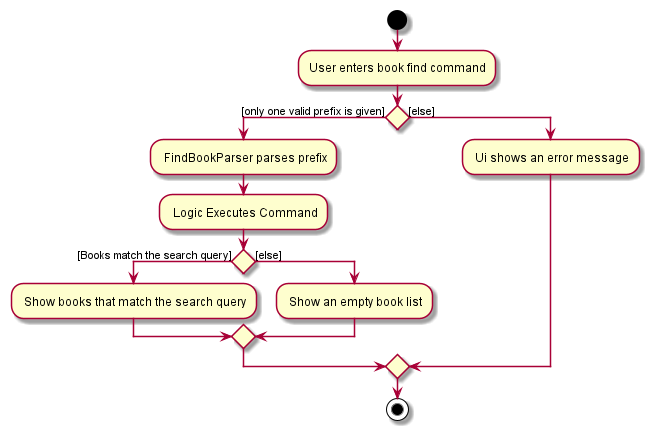
Design considerations
Each find query can only be one of either the tag, author or title. The feature is designed to display all books that match the predicate created and display them. We chose not to include the isbn as a user searchable query as it is likely that most users would remember the title of the book or the author’s name rather than the isbn.
To account for cases where there might be multiple editions of the same book, the book find will return partial matches. This increases usability as the librarian can find all books that match the title even if it is the first edition or the fifth.
The feature is also designed to make other features like borrow and request easier. LibTask can store a large amount of books and users cannot be expected to scroll through them just to find the index of the book they are looking for. book find aims to reduce the time spent searching by providing a simple way to search for your book in multiple ways.
[Proposed] Undo/redo state feature
Proposed Implementation
The proposed undo/redo mechanism is facilitated by VersionedLibTask. It extends LibTask with an undo/redo history, stored internally as an libTaskStateList and currentStatePointer. Additionally, it implements the following operations:
-
VersionedLibTask#commit()— Saves the current LibTask state in its history. -
VersionedLibTask#undo()— Restores the previous LibTask state from its history. -
VersionedLibTask#redo()— Restores a previously undone LibTask state from its history.
These operations are exposed in the Model interface as Model#commitLibTask(), Model#undoLibTask() and Model#redoLibTask() respectively.
Given below is an example usage scenario and how the undo/redo mechanism behaves at each step.
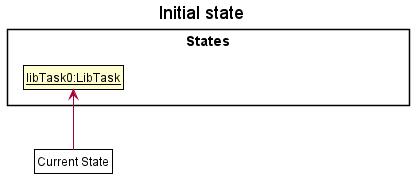
Step 1. The user launches the application for the first time. The VersionedLibTask will be initialized with the initial LibTask state, and the currentStatePointer pointing to that single LibTask state.
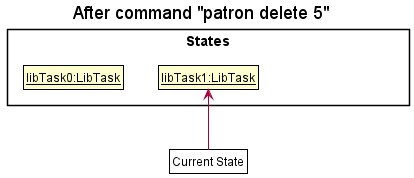
Step 2. The user executes patron delete 5 command to delete the 5th patron in the LibTask. The patron delete command calls Model#commitLibTask(), causing the modified state of the LibTask after the patron delete 5 command executes to be saved in the libTaskStateList, and the currentStatePointer is shifted to the newly inserted LibTask state.
Step 3. The user executes patron add n/David … to add a new patron. The patron add command also calls Model#commitLibTask(), causing another modified LibTask state to be saved into the libTaskStateList.
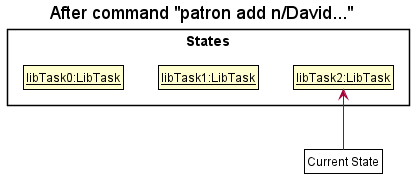
Note: If a command fails its execution, it will not call Model#commitLibTask(), so the LibTask state will not be saved into the libTaskStateList.
Step 4. The user now decides that adding the patron was a mistake, and decides to undo that action by executing the undo command. The undo command will call Model#undoLibTask(), which will shift the currentStatePointer once to the left, pointing it to the previous LibTask state, and restores the LibTask to that state.
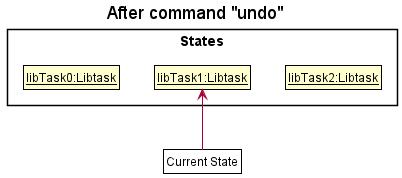
Note: If the currentStatePointer is at index 0, pointing to the initial LibTask state, then there are no previous LibTask states to restore. The undo command uses Model#canUndoLibTask() to check if this is the case. If so, it will return an error to the user rather than attempting to perform the undo.
The following sequence diagram shows how the undo operation works:
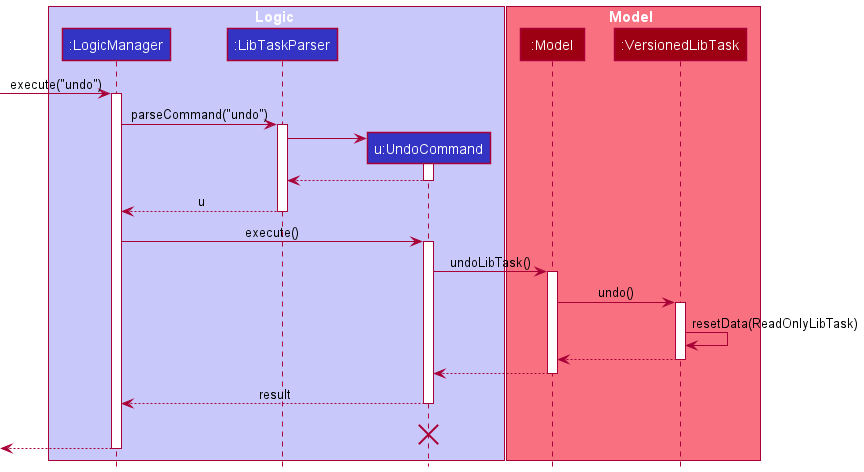
Note: The lifeline for UndoCommand should end at the destroy marker (X) but due to a limitation of PlantUML, the lifeline reaches the end of diagram.
The redo command does the opposite — it calls Model#redoLibTask(), which shifts the currentStatePointer once to the right, pointing to the previously undone state, and restores the LibTask to that state.
Note: If the currentStatePointer is at index libTaskStateList.size() - 1, pointing to the latest LibTask state, then there are no undone LibTask states to restore. The redo command uses Model#canRedoLibTask() to check if this is the case. If so, it will return an error to the user rather than attempting to perform the redo.
Step 5. The user then decides to execute the command list. Commands that do not modify the LibTask, such as list, will usually not call Model#commitLibTask(), Model#undoLibTask() or Model#redoLibTask(). Thus, the libTaskStateList remains unchanged.
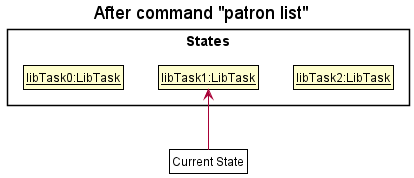
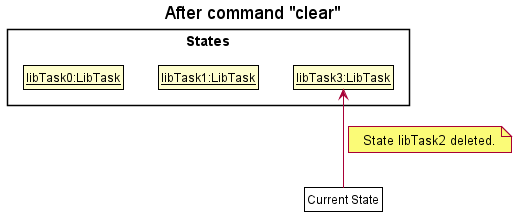
Step 6. The user executes clear, which calls Model#commitLibTask(). Since the currentStatePointer is not pointing at the end of the libTaskStateList, all LibTask states after the currentStatePointer will be purged. Reason: It no longer makes sense to redo the patron add n/David … command. This is the behavior that most modern desktop applications follow.
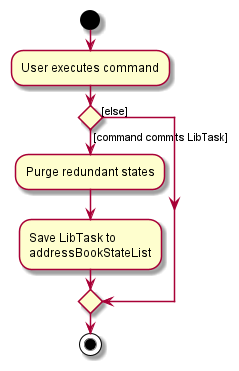
The following activity diagram summarizes what happens when a user executes a new command:
Design considerations:
Aspect: How undo & redo executes:
-
Alternative 1 (current choice): Saves the entire LibTask.
- Pros: Easy to implement.
- Cons: May have performance issues in terms of memory usage.
-
Alternative 2: Individual command knows how to undo/redo by
itself.
- Pros: Will use less memory (e.g. for
delete, just save the person being deleted). - Cons: We must ensure that the implementation of each individual command are correct.
- Pros: Will use less memory (e.g. for
Documentation, logging, testing, configuration, dev-ops
Appendix: Requirements
Product scope
LibTask aids NUS librarians in managing statuses of books borrowed and their borrowers. It also helps keep track of book requests and reminds the librarian to notify requesters when the requested book becomes available. However, LibTask’s product scope does not include notifying the requesters since LibTask does not have access to the school’s email API. LibTask also helps organize books and patrons into categories for effective querying and extraction of insightful data.
Target user profile:
- a librarian who wants to manage book loans and requests by patrons
- prefer desktop apps over other types of applications
- able to type fast
- prefers typing to mouse interactions
- is reasonably comfortable using CLI applications
Value proposition: simplifying how librarians manage library book loans and requests by patrons.
User stories
Priorities: High (must have) - * * *, Medium (nice to have) - * *, Low (unlikely to have) - *
| Priority | As a … | I want to … | So that … |
|---|---|---|---|
*** |
Librarian | add a patron | I can keep track of books borrowed or requested by the patron |
*** |
Librarian | delete a patron | I do not get overwhelmed by data of graduated students that are no longer patrons |
*** |
librarian | list all patrons | I can see all the existing patrons |
*** |
Librarian | add a book | I can keep track of details of the book |
*** |
Easily overwhelmed librarian | delete a book | I do not get overwhelmed by information about outdated books that no longer exist |
*** |
Librarian | list all books | I can see all the existing books |
*** |
Librarian | be able to view patron and book details through a GUI | I can easily recognize the existing patrons and books details |
** |
librarian | edit information about a patron | I have their latest contact when I need to contact them |
** |
Efficient librarian | find patrons based on their names | I do not get overwhelmed by long lists of patrons in uncategorized search results |
** |
Efficient librarian | view patrons with overdue books | I can contact them to return the overdue books |
** |
Careless librarian | edit information about a book | I can correct typos in the details of the books when I first added them |
** |
Request handler | filter books based on authors, titles and tags | I can quickly navigate the book when a patron is requesting it |
** |
Librarian | classify books into categories | I can more easily provide book recommendations |
** |
Librarian | store details about a book loan by a patron | I can perform tasks such as sorting, searching or categorizing books and patrons later |
** |
Request handler | take note of book requests from students | I can be reminded to notify the student when the book under request is returned |
** |
Librarian | find all the books related to a patron | I can see all books related to a patron at one glance |
** |
Librarian | update return and request status of books | I can keep track of a book’s availability |
** |
Efficient librarian | refer to previous commands | I can save time from retyping past commands |
* |
Efficient librarian | filter patrons in my database based on books | I can know which patrons are requesting or borrowing the book |
Use cases
(For all use cases below, the System is the LibTask and the Actor is the user, unless specified otherwise)
UC01: Add a patron
MSS
-
User requests to add a patron and provides the name and details of the patron.
-
LibTask adds the patron.
Use case ends.
Extensions
-
1a. Compulsory fields are not provided.
-
1a1. LibTask shows an error message.
Use case resumes from step 1.
-
-
1b. The patron details are invalid.
-
1b1. LibTask shows an error message.
Use case resumes from step 1.
-
-
1c. The patron to be added is considered as a duplicate.
-
1c1. LibTask shows an error message.
Use case resume from step 1.
-
UC02: List all patrons
MSS
-
User requests to list all patrons.
-
LibTask shows the list of all the patrons.
Use case ends.
Extensions
-
2a. LibTask has no stored patrons.
-
2a1. LibTask shows an empty patron list.
Use case ends.
-
UC03: Edit a patron
MSS
-
User list all patrons (UC02).
-
User requests to edit a patron and provide the index and the necessary details to be edited.
-
LibTask edits the patron.
Use case ends.
Extensions
-
1a. The index is not provided or is invalid.
-
1a1. LibTask shows an error message.
Use case resumes from step 2.
-
-
1b. The details are not provided or are invalid.
-
1b1. LibTask shows an error message.
Use case resume from step 2.
-
UC04: Find a patron
MSS
-
User request to find patron(s) and provide a number of keywords.
-
LibTask shows the list of patrons that match the search.
Use case ends.
Extensions
-
1a. Keywords not provided or are invalid.
-
1a1. LibTask shows an error message.
Use case resumes from step 1.
-
-
2a. No patrons fulfil the search criteria.
-
2a1. LibTask shows an empty list.
Use case ends.
-
UC05: Delete a patron
MSS
-
User list all patrons (UC02).
-
User requests to delete a patron and provide the index.
-
LibTask deletes the patron.
Use case ends.
Extensions
-
2a. The index is not provided or is invalid.
-
2a1. LibTask shows an error message.
Use case resumes from step 2.
-
-
2b. The patron has a book borrowed.
-
2b1. LibTask shows an error message.
Use case resumes from step 2.
-
-
3a. The patron has some books requested.
-
3a1. LibTask deletes the patron from the requesters of those books
Use case ends.
-
UC06: Add a book
MSS
-
User requests to add a book and provides the name and details of the book
-
LibTask adds the book.
Use case ends.
Extensions
-
1a. Compulsory fields are not provided.
-
1a1. LibTask shows an error message.
Use case resumes from step 1.
-
-
1b. The book details are invalid.
-
1b1. LibTask shows an error message.
Use case resumes from step 1.
-
UC07: List all books
MSS
-
User requests to list all books.
-
LibTask shows the list of all the books.
Use case ends.
Extensions
-
2a. LibTask has no stored books.
-
2a1. LibTask shows an empty book list.
Use case ends.
-
UC08: Edit a book
MSS
-
User requests to edit a book and provides the index of the book and the details.
-
LibTask edits the book.
Use case ends.
Extensions
-
1a. The given index is invalid.
-
1a1. LibTask shows an error message.
Use case resumes from step 1.
-
-
1b. The new details are invalid.
-
1b1. LibTask shows an error message.
Use case resumes from step 1.
-
UC09: Find a book
MSS
-
User requests to find book(s) and provides either a tag, author or title.
-
LibTask shows the books that match the search.
Use case ends.
Extension
-
1a. The given search input is invalid.
-
1a1. LibTask shows an error message.
Use case resumes from step 1.
-
-
1b. No books match the given query.
-
1b1. LibTask shows an empty list.
Use case ends.
-
UC10: Delete a book
MSS
-
User requests to delete a book and provides the index.
-
LibTask deletes the book.
Use case ends.
Extensions
-
1a. The given index is invalid.
-
1a1. LibTask shows an error message.
Use case resumes from step 1.
-
-
1b. The book is being borrowed.
-
1b1. LibTask shows an error message.
Use case resumes from step 1.
-
UC11: Borrow a book
MSS
-
User lists all patrons (UC02).
-
User lists all books (UC07).
-
User requests to establish a borrow relationship and provides index of the patron and index of the book in lists, as well as return date of the book.
-
LibTask establishes a borrow relationship between the patron and the book.
Use case ends.
Extensions
-
3a. The given input is invalid.
-
3a1. LibTask shows an error message.
Use case resumes from step 3.
-
-
3b. The book is already borrowed.
-
3c1. LibTask shows an error message.
Use case resumes from step 3.
-
UC12: Return a book
MSS
-
User finds a patron (UC04).
-
User requests to end a borrow relationship and provides index of the patron or index of the book in lists.
-
LibTask removes the borrow relationship between the patron and the relevant book(s).
Use case ends.
Extensions
-
2a. The given input is invalid.
-
2a1. LibTask shows an error message.
Use case resumes from step 2.
-
-
2b. The book is not borrowed.
-
2b1. LibTask shows an error message.
Use case resumes from step 2.
-
-
2c. The patron has not borrowed any books.
-
2c1. LibTask shows an error message.
Use case resumes from step 2
-
UC13: Show previously run commands
MSS
-
User requests to see previous command.
-
LibTask shows the last command used.
Use case ends.
Extension
-
1a. No previous command
-
1a1. LibTask shows an empty CommandBox.
Use case ends.
-
UC14: List books related to a patron
MSS
-
User lists all patrons (UC02).
-
User requests to view all books related to a patron and provides the index of the patron in the list.
-
LibTask shows the list of all the books related to the patron.
Use case ends.
Extension
-
2a. The given index of patron is invalid.
-
2a1. LibTask shows an error message.
Use case resumes from step 2.
-
-
3a. There are no books related to the patron
-
3a1. LibTask returns an empty book list.
Use case ends
-
UC15: List patrons with overdue books
MSS
-
User lists all patrons (UC02).
-
User requests to view all patrons with overdue books.
-
LibTask shows the list of all patrons with overdue books.
Use case ends.
Extension
-
2a. LibTask has no users with overdue books.
-
2a1. LibTask shows an empty patron list.
Use case ends.
-
UC16: Request a book
MSS
-
User lists all patrons (UC02).
-
User lists all books (UC07).
-
User requests to establish a request relationship and provides index of the patron and index of the book in lists.
-
LibTask establishes a request relationship between the patron and the book.
Use case ends.
Extensions
-
3a. The given input is invalid.
-
3a1. LibTask shows an error message.
Use case resumes from step 3.
-
-
3b. Patron has already requested for the book.
-
3b1. LibTask shows an error message.
Use case resumes from step 3.
-
-
3c. The book is already borrowed by the same user.
-
3c1. LibTask shows an error message.
Use case resumes from step 3.
-
-
3d. The book is available for borrowing.
-
3d1. LibTask shows an error message.
Use case resumes from step 3.
-
-
3e. The book already has maximum number of requesters.
-
3e1. LibTask shows an error message.
Use case resumes from step 3.
-
UC17: Ask for Help on LibTask
MSS
-
User requests to for help.
-
LibTask opens a new window containing the link to the user guide.
Use case ends.
UC18: Exit LibTask
MSS
-
User requests to exit LibTask.
-
LibTask closes.
Use case ends.
UC19: Clear all patrons and books
MSS
-
User requests to clear all patrons and books.
-
LibTask clears the all patrons and books.
Use case ends.
Non-Functional Requirements
- Should work on any mainstream OS as long as it has Java
11or above installed. - Should be able to hold up to 1000 patrons and books without a noticeable sluggishness in performance for typical usage.
- A user with average regular English text typing speed (i.e. not code, not system admin commands) should be able to accomplish most of their tasks faster using commands than using a mouse.
- A novice with no coding background should be able to use the LibTask.
- The system should respond in 1 second.
Glossary
| Term | Explanation |
|---|---|
| Mainstream OS | Windows, Linux, macOS. |
| Patron | A user of the library. |
| ISBN | An International Standard Book Number used to identify a book. 10 or 13 digits in length. |
| MSS | Main Success Scenario. |
| CLI | Command-line interface processes commands to a computer program in the form of lines of text. |
| GUI | Graphical user interface allows users to interact with a software through icons and buttons instead of text-based commands. |
| API | Application Programming Interface is a connection between computer programs. |
| Immutable | Unchanging over time or unable to be changed. |
| Placeholder | A character, word, or string of characters that temporarily takes the place of the final data. |
| OOP | Object Oriented programming is a programming paradigm that relies on the concept of classes and objects. |
| Entity | Any singular, identifiable and separate object. |
| json | An open standard file format and data interchange format that uses human-readable text to store and transmit data objects consisting of attribute–value pairs and arrays. |
| Attribute | A specification that defines a property of an object. |
| Cyclic reference | A circular reference is a series of references where the last object references the first, resulting in a closed loop. |
| Parameter | Allow us to pass information or instructions into functions and procedures. |
| Single Responsibility Principle | States that each class should have one responsibility, one single purpose. |
| Query | A request for information expressed in a formal manner. |
Appendix: Instructions for manual testing
Given below are instructions to test the app manually.
Note: These instructions only provide a starting point for testers to work on;
testers are expected to do more exploratory testing.
Launch and shutdown
-
Initial launch
-
Download the jar file and copy into an empty directory as
libtask.jar -
Double-click the jar file. If this fails, navigate to the directory using command line run
java -jar libtask.jar
Expected: Shows the GUI with a set of sample contacts. The window size may not be optimum.
-
-
Saving window preferences
-
Resize the window to an optimum size. Move the window to a different location. Close the window.
-
Re-launch the app by double-clicking the jar file.
Expected: The most recent window size and location is retained.
-
Adding a patron
-
Adding a patron with all required parameters. Invalid patron id.
- Test case:
patron add n/Alice s/A11111111 p/90123212 e/studentA@u.nus.edu t/computing
Expected: Patron list remain unchanged. Error details shown in the status message.
- Test case:
-
Adding a patron with missing required parameters.
- Test case:
patron add n/Alice s/A1111111H p/90123212 t/computing
Expected: Patron list remain unchanged. Error details shown in the status message.
- Test case:
-
Adding a patron with all required parameters. All provided parameters are valid.
-
Prerequisite: There does not exist any patron named Alice, or has id A1111111H, or email studentA@u.nus.edu in LibTask.
-
Test case:
patron add n/Alice s/A1111111H p/90123212 e/studentA@u.nus.edu t/computing
Expected: Patron namedAlicewith idA0123456H, phone number90123212emailstudentA@u.nus.eduand tagcomputingadded to patron list. Details of added patron shown in status message.
-
Editing a patron
-
Editing patrons while all patrons are listed.
-
Prerequisites: List all patrons using the
patron listcommand. Ensure that there is only one patron in the patron list. -
Test case:
patron edit 2 n/John Cena s/A2222222H p/91959491 e/johncena@u.nus.edu
Expected: Patron list remain unchanged. Error details shown in the status message. -
Test case:
patron edit 1 n/John Cena s/A2222222H p/91959491 e/johncena@u.nus.edu
Expected: Name, id, phone number and email of the first patron in the book list are changed to “John Cena”, “A2222222H”, “91959491”, “johncena@u.nus.edu” respectively. Details of edited patron shown in status message.
Finding a patron based on patron name
-
Searching for patrons based on their names while there are no patrons with the names matching the provided keywords.
-
Prerequisites: List all patrons using the
patron listcommand. Ensure that there are no patrons with names containing the word “Alex”. -
Test case:
patron find alex
Expected: Patron list is empty.
-
-
Searching for patrons based on their names while there are patrons with the names matching the provided keywords.
-
Prerequisites: List all patrons using the
patron listcommand. Ensure that there is at least one patron whose name contains the word “Alex”. -
Test case:
patron find alex
Expected: Patron list displays all patrons with names containing the word “Alex”. Status message shows 1 patron listed.
-
Finding patrons with overdue books
-
Displaying patrons with overdue books while all patrons are listed.
-
Prerequisites: List all books using the
book listcommand. List all patrons usingpatron listcommand. Multiple patrons in the patron list. Multiple books in the book list. Ensure that there are some books borrowed with return dates after the present date. -
Test case:
patron overdue
Expected: Patron list updated to show a list of patron who is a borrower of at least one book with return date before the present date. Status message shows “Listed all patrons with overdue books”.
-
Adding a book
-
Adding a book.
-
Prerequisite: Ensure that if a book with isbn
9780371888506already exists, it must be namedIntroduction to Algorithmsand have authorsCormen,Leiserson,RivestandStein. -
Test case:
book add n/Introduction to Algorithms a/Cormen a/Leiserson a/Rivest a/Stein i/9780371888506 t/ComputerScience
Expected: Book namedIntroduction to Algorithmswith isbn9780371888506, authorsCormen,Leiserson,Rivest,Steinand tagComputerScienceadded to book list. Status message shows details of newly added book. -
Test case:
book add n/Introduction to Algorithms a/Cormen a/Leiserson a/Rivest a/Stein i/97803718 t/ComputerScience
Expected: Book list remain unchanged. Error details shown in the status message.
-
Listing all books
-
Listing all books with no books in LibTask’s book list.
-
Prerequisites: Ensure that there are no books in LibTasks’s book list by entering
clearin the Command box. -
Test case:
book list
Expected: Book list is empty. Status message shows listed all books.
-
-
Listing all books with at least one book in LibTask’s book list.
-
Prerequisites: Remove LibTask’s existing data by entering
clearin the Command box and then add at least on book to the book list. -
Test case:
book list
Expected: All books added after entering theclearcommand appear in the book list. Status message shows listed all books.
-
Listing all books related to a patron
-
Listing all books borrowed by or requested by a patron while all books and patrons are being shown.
-
Prerequisites: List all books using the
book listcommand. List all patrons withpatron listcommand. Multiple books in the book list. Multiple patrons in the patron list. First book is borrowed by the first patron. Second book is requested by the second patron. -
Test case:
book related 1
Expected: Only the first book is shown in the book list. Status message shows that all books related to first patron is listed. -
Test case:
book related 2
Expected: Only the second book is shown in the book list. Status message shows that all books related to first patron is listed. -
Test case:
book related 0
Expected: Book list remains unchanged. Error details shown in the status message. -
Other incorrect book related commands to try:
book related,book related x,...(where x is larger than the size of patron list)
Expected: Similar to previous.
Editing a book
-
Editing books while the provided isbn matches that of another book apart from the one being edited.
-
Prerequisites: List all books using the
book listcommand. Ensure that there is more than one book in the book list. Ensure that the isbn of a book other than the first one matches “9780371888506”. -
Test case:
book edit 1 i/9780371888506
Expected: Book list remain unchanged. Error details shown in the status message.
-
-
Editing books while the provided index and parameters are valid.
-
Prerequisites: List all books using the
book listcommand. Ensure that there is at least one book in the book list. Ensure that no other book other than the first one has an isbn that matches “9780371888506”. -
Test case:
book edit 1 n/Harry Potter 1 i/9780371888506
Expected: Title and isbn of the first book in the book list are changed to “Harry Potter 1” and “9780371888506” respectively. All books with the same isbn as the first one before entering the book edit command will have their titles changed toHarry Potter 1as well. Details of edited book shown in status message. -
Test case:
book edit 0 n/Harry
Expected: Book list remain unchanged. Error details shown in the status message.
-
Deleting a book
-
Deleting an available book while all books are being shown.
-
Prerequisites: List all books using the
book listcommand. Ensure that there is only one book in the book list and it is not borrowed. -
Test case:
book delete 2
Expected: No book is deleted. Error details shown in the status message. -
Test case:
book delete 1
Expected: First book is deleted from the list. Details of the deleted book shown in the status message.
-
Borrowing a book
-
Borrowing a book while all books and patrons are being shown and provided parameters are invalid.
-
Prerequisites: List all books using the
book listcommand. List all patrons using thepatron listcommand. Ensure that there is one patron in the patron list and one book in the book list. -
Test case:
borrow 2 0 01-May-2022
Expected: No book is borrowed. Error details shown in the status message.
-
-
Borrowing a book while all books and patrons are being shown and provided parameters are valid.
-
Prerequisites: List all books using the
book listcommand. List all patrons using thepatron listcommand. Multiple books in the book list. Multiple patrons in the patron list. The first book must be available. The first patron is not borrowing any book with the same ISBN as the first book. The second book is already borrowed by the second patron. -
Test case:
borrow 1 1 01-May-2022
Expected: First book is borrowed by first patron with a return date of 01-May-2022. The initialAvailabletag on the borrowed book is changed toBorrowed. Two additional rows of information is shown underBorrowed. The additional information is the borrower’s name and the return date. Details of the book loan shown in status message. -
Test case:
borrow 1 2 01-May-2022
Expected: No book is borrowed. Error details shown in the status message. -
Test case:
borrow 2 2 01-May-2022
Expected: No book is borrowed. Error details shown in the status message.
-
Returning a book or some books
-
Returning a book that has at least one requester while all books and patrons are being shown.
-
Prerequisites: List all books using the
book listcommand. List all patrons using thepatron listcommand. Multiple books in the book list and multiple patrons in the patron list. The first book must be borrowed. The first book is requested by the first patron. -
Test case:
return b/1Expected: First book is returned. The initialBorrowedtag on the returned book is changed toAvailable. The rows showing the borrower and return date is removed. TheRequested Bytag is removed and the row showing name of the requester is removed. A reminder message is shown in the status message to remind the librarian to notify the first patron. -
Test case:
return b/0Expected: No book is returned. Error details shown in the status message.
-
-
Returning all books by a patron while all books and patrons are being shown.
-
Prerequisites: List all books using the
book listcommand. List all patrons using thepatron listcommand. Multiple books in the book list and multiple patrons in the patron list. Only the first book, second book, and third book are borrowed by the first patron. Among the three books, some have requesters while some do not have requesters. -
Test case:
return p/1Expected: The first, second, and third books are returned. For all returned books, the initialBorrowedtag on the returned book is changed toAvailable. The rows showing the borrower and return date is also removed. For all returned books that have requesters, theRequested Bytag and the row showing names of requesters will be removed. Reminder messages is shown in the status message to remind the librarian to notify patrons who requested for some of the returned books.
-
Requesting a book
-
Requesting a book while all books and patrons are being shown.
-
Prerequisites: List all books using the
book listcommand. List all patrons using thepatron listcommand. Multiple books in the book list. Multiple patrons in the patron list. The first book and all its copies must be borrowed. The first book must not already be requested by the first patron, and does not have any requesters. -
Test case:
book request 1 1
Expected: All books with same isbn as the first book is requested by the first patron. For all such books, an additionalRequested Bytag is shown under the row with return date. Name of requester is shown under theRequested Bytag. Details of request shown in status message. -
Test case:
book request 0 1
Expected: No book is requested. Error details shown in the status message.
-
-
Requesting a book that has some available copies.
-
Prerequisites: List all books using the
book listcommand. List all patrons using thepatron listcommand. Multiple books in the book list. Multiple patrons in the patron list. The first book is borrowed. The second book has the same isbn as the first book and is available. -
Test case:
book request 1 1
Expected: No book is requested. Error details shown in the status message.
-
Finding books based on tags, author, title
-
Searching for books based on their titles while there are books with titles matching the provided keywords.
-
Prerequisites: List all books using the
book listcommand. Ensure that there is one book whose title contains the word “Harry”. -
Test case:
book find n/HarryExpected: Book list displays the book with title containing the word “Harry”. Status message shows 1 book listed.
-
-
Searching for books based on their authors while there are books with authors matching the provided keywords.
-
Prerequisites: List all books using the
book listcommand. Ensure that there is one book with at least one author whose name contains the word “Suzanne”. -
Test case:
book find a/SuzanneExpected: Book list displays the book with at least one authors whose name contains the word “Suzanne”. Status message shows 1 book listed.
-
-
Searching for books based on their tags while there are books with tags matching the provided keyword.
-
Prerequisites: List all books using the
book listcommand. Ensure that there is one book with at least one tag matching the word “Romance”. -
Test case:
book find t/RomanceExpected: Book list displays the books with at least one tag matching the word “Romance”. Status message shows 1 book listed.
-
Appendix: Effort
LibTask is a result of tremendous effort put in by each of the team members. Since the beginning of the project, our team met up consistently for six to eight hours weekly to discuss ideas for improving LibTask, as well as reviewing and debugging code to maintain LibTask’s high quality code base. The section below outlines different aspects of challenges faced throughout the development of LibTask, justification of notable efforts put in, as well the achievements of LibTask that the development team is proud of.
Extension of Model component and non-unique nature of BookList
The original restrictions on PersonList in AB-3 that disallows Person with the same name is a convenient way of avoiding bugs. For the purpose of LibTask, however, it does not make sense to disallow books with the same name, or isbn, or authors etc. This is because libraries often contain multiple copies of the exact same book. There can be multiple Book objects with the exact same name, isbn, author, and status, therefore BookList can be buggy because it can contain multiple objects that are same based on Book::equals() method. This is resolved by adding a timeAdded attribute, which is the time the book is added into the system. This attribute cannot be changed through any commands, and therefore solves the above-mentioned problem.
Another challenge is that the use case of LibTask also requires that all books with the same isbn must have the same name and authors. An initial consideration is to use the Abstract Occurence pattern in Week 10 topics, where a single book is represented by Abstraction and Occurence classes. However, this pattern binds book name and authors to isbn, and enforces a stronger than necessary requirement that books with same name must have the same isbn. This does not fit our use case because books with different edition can have the same name but different isbn. Hence, our team deliberately chose not to enforce such a constraint through design patterns, but rather introduced the following invariant and maintained the invariant at each step of command execution:
Invariant 1: If a book has same isbn as another book, then both books must have the same name, and same set of authors.
The method used to maintain such invariants is discussed in the next section.
Elimination of Data Inconsistency
The original AB-3 code only contains one main type of object, which is Person object. Upon extension of Model component to include Book object that references Patron object, many data inconsistencies arise due to the immutable nature of Book and Patron. One example is that when a patron is edited, books borrowed and requested by that patron may not have their borrower and requester information updated, causing the name displayed on Book Card to be outdated.
Instead of relying only on testing, LibTask uses a formal method approach to establish certain invariants to be held true after execution of every command, and use these invariants to prove the absence of data inconsistency bugs during the execution of the program. Some invariants were shown below to illustrate the careful consideration by the team to eliminate bugs:
Invariant 1: A book can have requesters if and only if it does not have an available copy (i.e. another book with the same isbn).
Invariant 2: Books with the same isbn must have the same set of requesters.
Invariant 3: Borrower and requester information of a book must be the most updated patron information.
To maintain invariant 1, we identify commands that can possibly add requesters, such as book request command, and commands that can modify availability of a book copy, such as borrow, return, and non-trivially book edit, book add and patron delete commands. We then impose suitable restrictions or behaviour modifications to those commands to ensure invariant 1 is maintained, as follows:
book request: Modify initial behaviour such that only books with no available copies can be requested, shows error otherwise.
borrow: No modification required
return: When a book is returned and becomes available, the second part of the invariant is violated. To maintain the invariant, all requesters are removed from all copies of the book, and the librarian is reminded to notify all those requesters.
book edit: When a book is edited to another existing isbn, it may be an available book, which causes the new isbn to have an available copy. One way of maintaining invariant 1 is to remove all requesters for the new isbn and notify them, while another way is to disallow such edits. Our team chose the later method as this method is a more rational way of maintaining invariant 2 as well. When editing a book into another existing isbn, the set of requesters may be different for both old and new isbn, resulting in the new isbn now having a book copy with different requesters. For example, the user wants to change isbn of book A from 1 to 2, but different requesters are requesting for books with isbn 1 and 2. One method is to change the requesters of all books with isbn 2 to the requesters of book A, then invariant 2 is maintained. This does not make sense from the user point of view because the requesters of book A were originally requesting for isbn 1, not isbn 2. Hence, disallowing such an action is a better way to maintain data consistency.
book add: When adding another copy of existing, the previous copies may all be borrowed and requested by some patrons. Since there is now an available copy, the behaviour of book add is also modified to remove all requesters and remind the librarian to notify them in such a situation, in order to maintain invariant 1.
patron delete: When deleting a patron that has unreturned books, the decision to be made is whether the borrowed book should become available. If it becomes available, then the librarian should be reminded to notify all requesters for that book to maintain invariant 1. This does not make sense because physically the book is not returned yet. It also does not make sense to perform a cascading deletion on book when patron is deleted, because they are viewed as separate independent entities. Therefore, a decision is made to disallow deletion of patron with borrowed books
The detailed reasoning above demonstrates the rigorous reasoning adopted by our team before deciding on every minor behavioural changes to LibTask commands, in order to maintain data integrity. The thought process for maintaining other invariants are similar and thus omitted for brevity.
Achievement
Our team is proud that we do not only rely on testing, but also rigorous reasoning and formal methods to prove the absence of data inconsistency bugs, while imposing only reasonable restrictions to our commands. Among the 50 bug reports received during Practical Exam Dry Run, none of the bugs received are related to data inconsistency.